
Part One: Drive-thru Accessibility Issues in the Physical World
A few days ago, I was hungry and craving fried chicken after my night class. I saw my coupon lying in the car and decided to go drive-thru at Popeyes on Airport Blvd. This is how the accessibility story starts.

But wait…What is Drive-Thru at Popeyes?
Popeyes is a fast-food restaurant serving chicken dishes. Besides dine-in service, Popeyes provides a drive-through service that allows drivers to order through speakers, make payments, and pick up their orders within their vehicles. In this scenario, the main accessible issues are focusing on the customer experience from entering to picking up orders via the drive-thru service.
Discovering Accessible Issues
“Where is the Drive-thru?”
That night, when I arrived at Popeyes, I couldn’t find the drive-thru because of the dime light without clear instructions. No line marking, no sign guiding, and two light boards spaced a few feet away made me confused about where to order on the drive-thru.
The issues occurred during the drive-thru service:
• The drive-thru sign points to the exit;
• Drive-thru lane is not marked;
• Two menu boards with no obvious sign saying “order here”;
• The ordering board has no sign for the speaker and no other options if assistance is needed.

Then, “What about people who are hard of hearing?“
The first thing that came to my mind was how deaf and hard-of-hearing customers access drive-thru. Without clear instructions, it heavily depends on its customer service and ordering experience. Individuals who are deaf or hard of hearing have to know either where to order and write down their orders before the window, or get discouraged.
The Americans with Disabilities Act (ADA) requires that drive-thru services be accessible for individuals such as deaf and hard-of-hearing customers to order at the window. However, without clear instructions, it depends heavily on customer service.
Customers with deafness and hearing loss
- do not know where to inform others of their disabilities if they cannot find the speaker;
- need to write down their orders if the employee cannot read sign language.
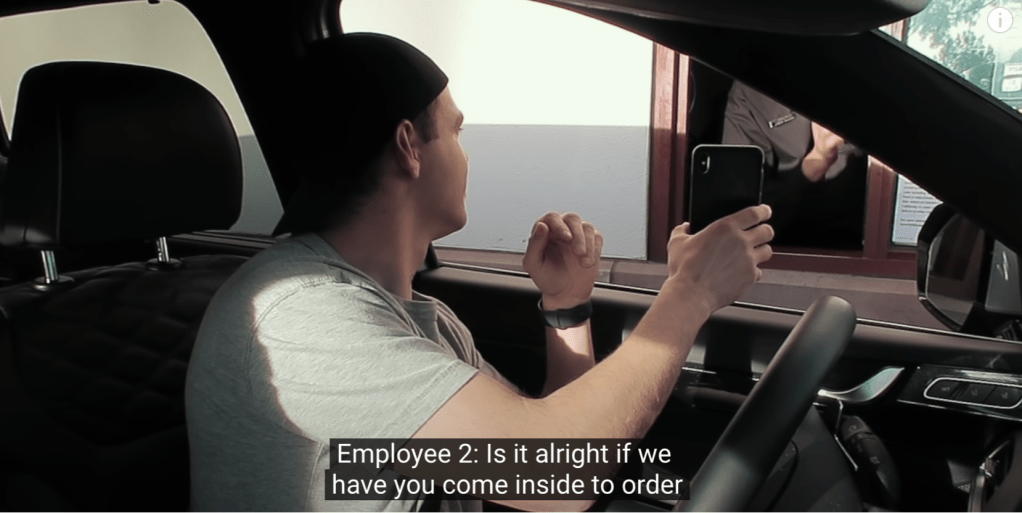
In this scenario, he met rude employees who were not willing to read his screens and even asked him to order inside.
Screenshot from YouTube: Deaf Man vs. Drive Thru: They Threw Away My Food!, Sign Duo
Customers with cognitive impairment
- are unable to decide their order in front of the speaker in a short time;
- may have a hard time reading the menu sitting in the car.

The speaker is not easy to tell on the drive-thru board, especially at night.
Customers who are visually impaired
- are unable to notice small signs guiding them to the drive-thru;
- are unable to read the menu at a distance such as Amblyopia.
Customers who have limited mobility
- are unable to reach the window because the counter is too high, especially for a wheelchair without lifting functions.

In this scenario, he was unable to reach the window and the employee was helping him to process payment and orders.
Screenshot from youtube: Riding a Wheelchair Through Drive Thru
Customers living Independently (such as the elderly)
- may find it difficult to drive themselves for the service, especially for people who are unfamiliar with it;
- may need others’ assistance if it’s challenging to read the menu, decide, and move limited.
Solving the Issues
Applicable Solutions to Improve Accessibility
For the drive-thru at Popeyes, the possible solutions to solve accessible issues addressed before are below:
- Accessible Communication System: Installing intercom with volume control, clarity, and compatibility with hearing aids as well as providing a screen with simple text, video, or buttons to notify employees of hearing assistance.
- Clear Instructions: Marking lines for the drive-thru lane and setting signs like “Order Here” to show clearly the way. (e.g. In-N-Out Drive-thru)
- Reachable Height: Modifying the window to an accessible height for wheelchairs or providing assistance to the door close to the window for employees to come out and provide services.
- Alternative Menu Options: An accessible menu can be provided for people with visual disabilities such as a menu with bigger text fonts or a digital menu via a QR code.
- Food Delivery Services: Using third-party apps like Uber Eats and DoorDash, or food delivery services provides an option for ordering if customers have difficulties driving, reading, and completing orders.
- Training and Awareness: Training staff on disability awareness and on supporting customer services for individuals with disabilities. This is important to encourage people to understand accessibility and people with disabilities to do drive-thru by themselves.
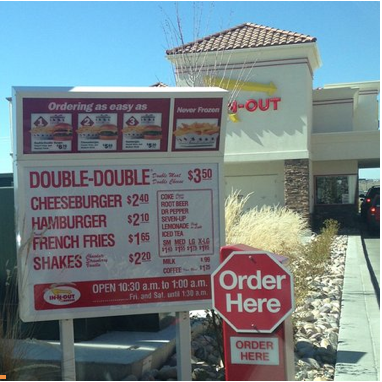
For example, the “Order Here” sign is obvious and the menu text are large enough to read in certain way.
From the perspective of a UX Designer
Interdisciplinary Approaches
To successfully solve the problems. it will require approaches between Popeye’s Manager, Accessibility UX or CX Researchers, Architects, Engineers, Accessibility Consultants, Technology Experts, Developers, and customers to figure out the best solutions to improve accessibility.
Continue to read PART TWO in the digital scenario and comparison →

 Tsai-Shiuan Weng