
Part Two: Fitness Class Scheduling System’s Accessibility Issues in the Digital World
After the drive thru topic, it hit me that my recent fitness class scheduling system is one of the common digital platforms people interacting with frequently in recent days.

What is the Wellness Living System?
Wellness Living System is a web application for customers to schedule classes in Lache’s public and private fitness classes. The main discussion is focusing on the web application’s accessibility from buying membership, and registering for classes to canceling or managing memberships.
Discovering Accessible Issues
“Where should I start and select?”
My first visit was to purchase a 3-class pass listed on the website. After locating the store page, I was confused about where to look for the pass. It took a minute to understand that I was in the right category and had to scroll down for the products.
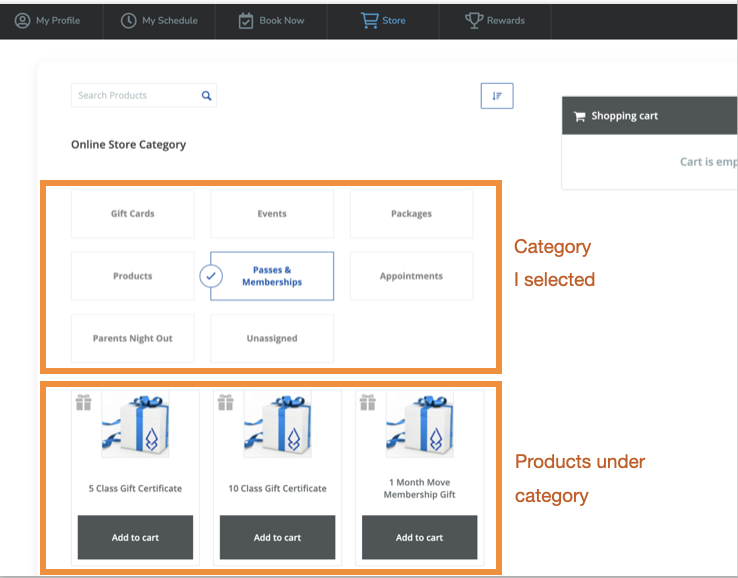
More issues were identified when I was browsing each page. I identified each issue shown as below.
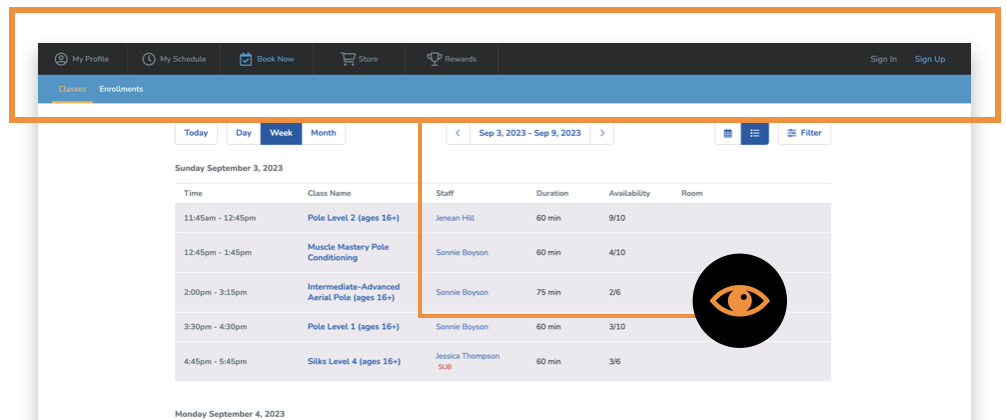
Issues in the ‘Book Now’ Page
Customers who are visually impaired
- may struggle with the lower contrast colors in the header: Grey text vs. Dark background;
- with blue-yellow blindness have a hard time seeing the tabs on the second row;
- cannot use the website by themselves if an audio assistant is needed.
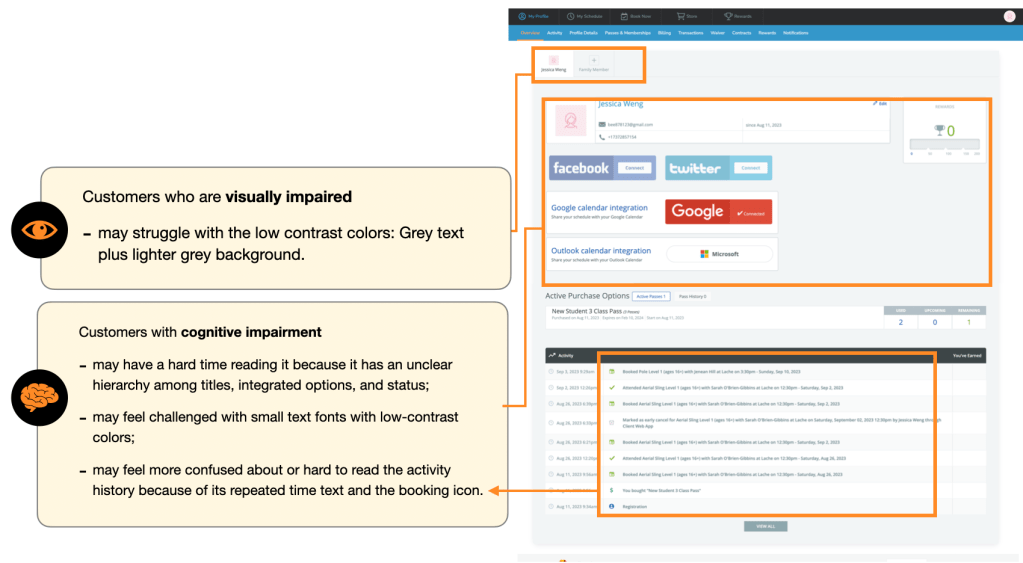
Issues in the ‘My Profile’
Customers with visual impairment
- may struggle with the low contrast colors: Grey text plus lighter grey background.
Customers with cognitive impairment
- may have a hard time reading it because it has an unclear hierarchy among titles, integrated options, and status;
- may feel challenged with small text fonts with low-contrast colors;
- may feel more confused about or hard to read the activity history because of its repeated time text and the booking icon.
Issues in the ‘My Schedule’ and More
In this section, I take “My Schedule” as an example. However, the accessible issues are extending to the overall web app.
Customers living Independently (such as the elderly)
- may need a help center or voice assistant when encountering problems with the scheduling system;
- may need another language to read the information.
Customers with limited mobility
- have no alternatives other than using a mouse. This may refer to people who are slightly hurt and need a tab to select.

Solving the Issues
Applicable Solutions to Improve Accessibility
For the wellness living system, the primary solutions to solve accessible issues are below:
- Improving Keyboard Navigation: Using keyboard navigation as an alternative. The order must be logical and intuitive for users to register for classes.
- Increasing Color Contrast: Adjusting low-contrast to meet the WCAG’s requirements.
- Making Content Hierarchy Clear: Modifying the text fonts for titles, subtitles, and paragraphs can bring out a clear architecture for the layout. This can help people understand which one is a priority to read and find the important information for the next step.
- Adding Audio assistance or Chat Box: Audio assistance with keyboard navigation can help people with visual disabilities or mobile disabilities to find their preferred classes as well as use a chatbot for solving problems during registration.
From the perspective of a UX Designer
Interdisciplinary Approaches
To successfully solve the problems. it will require approaches between Lache Movement’s Manager or Owner, Accessibility UX Researchers, UX Designers, Web Application Developers, Accessibility Consultants, and customers to figure out the best solutions to improve accessibility.
Conclusion
Comparison of Two Scenarios

Physical A11y Scenario
Drive-Thru at Popeyes
Presents challenges for users with hearing, visual, cognitive, and mobility disabilities as well as older people who live independently.
Straightforward changes such as installing accessible communication systems, setting clear instructions, adjusting reachable heights, offering alternative menu options, food-delivery services and training staff awareness could make the web app accessible to everyone.
Successful solutions require an interdisciplinary approach among the Manager or Owner, Accessibility UX Researchers, UX Designers, Web Application Developers, Accessibility Consultants, Partnership Managers and customers.
Digital A11y Scenario Wellness Living Systems
Presents challenges for users with visual, cognitive, and mobility disabilities as well as older people who live independently.
Straightforward changes such as increasing contrast, improving keyboard navigation, prioritizing hierarchy, or adding audio assistance/chatbox could make the web app accessible to everyone.
Successful solutions require an interdisciplinary approach among the Manager or Owner, Accessibility UX Researchers, UX Designers, Web Application Developers, Accessibility Consultants, and customers.
Takeaways
The observations and thinking process for potential solutions to accessibility gave me more insights and awareness of different scenarios. First, it brought me back to my old project during the summer to check its accessible issues and to solve the problems that could be fixed right away.
Second, it gave me a more complete empathic thinking process for accessibility. I found myself thinking of accessibility when designing interfaces but easily missing some parts or thinking about some parts afterward without a more efficient way. For example, it raises my awareness of ensuring the color contrast meets WCAG while relating red-green color schemes. I feel more confident about making design decisions when referring to accessibility.
Last but not least, my mindset now tends to combine physical and digital A11y scenarios. This helps a lot for designing within a startup to solve the real pain points. From UX research and design perspectives, empathizing with users needs to include every scenario to figure out the right solution to pain points. However, I also find it challenging when it comes to fast development in startups, it’s hard to implement some function for accessibility or solve potential issues in such a short time. My solutions are focusing on the feasibility within the current development but note down and design with the accessible mindset which can expand to more accessible cases in the future.
References
- Make Fast-Food Drive-Thru Services Accessible https://www.disabilityrightstn.org/make-fast-food-drive-thru-services-accessible/
- Deaf Man vs. Drive Thru: They Threw Away My Food! https://youtu.be/_gXbWtGAcS8?feature=shared
- Riding a Wheelchair Through Drive Thru https://youtu.be/ZqfhFK-pA1Q?feature=shared
- VISUALLY IMPAIRED VS. DRIVE THRU | Restaurant Menus For the Visually Impaired https://youtu.be/U78Xqu_OTAo?feature=shared
- Disability Impacts All of Us, CDC Information: https://www.cdc.gov/ncbddd/disabilityandhealth/infographic-disability-impacts-all.html

 Tsai-Shiuan Weng