
Contact Management Optimization
Enhancing contact management workflows to boost recruiting efficiency and user experience by leveraging a research-driven and systematic design approach.
My Role
Senior Product Designer
Area
Design, Research
Platform
Desktop Web Application
Highlights
I led a design team of three to prototype and redesign the Contact Management experience for a recruitment CRM, focusing on improving workflow efficiency, data visibility, and searchability. Through user research, iterative testing, and collaboration with stakeholders, we transformed a developer-led interface into a scalable, user-centered system that helps recruiters manage candidates and clients faster and more accurately.
⬆️
4% Higher Engagement on Contact List
Improved layout, visual cues, and searchability led to a 4% increase in user engagement on the contact list page, helping recruiters find and manage information more efficiently.
⌛
20% Faster Contact Creation
Streamlined the “Add New Contact” workflow with real-time entry and auto-population during calls, reducing manual steps and cutting task completion time by 20%.
🚀
Scalable, Systematic Foundation
Established reusable design patterns for data visibility, verification, and search—forming the basis for future enhancements across other core management pages.
Background
Following a navigation redesign and the establishment of key design principles—Scalability, Data Visibility, and Searchability—our next challenge was improving Contact Management, a core recruiter workflow.
User research revealed major pain points in the existing developer-led implementation:
- Lack of Visual Cues: Unclear color indicators and feedback led to confusion.
- Broken or Missing Features: Key actions like search and filter failed or were missing.
- Inefficient Layout: Poor hierarchy slowed scanning and task completion.
- Limited Data Handling: The system couldn’t support complex job attributes or multi-role contacts.
Additionally, the business requested support for sales workflows, requiring a unified and scalable system that could handle recruiting and sales data within one flow.

Approaches
Our design process unfolded in three key explorations, each tackling a critical recruiter workflow.
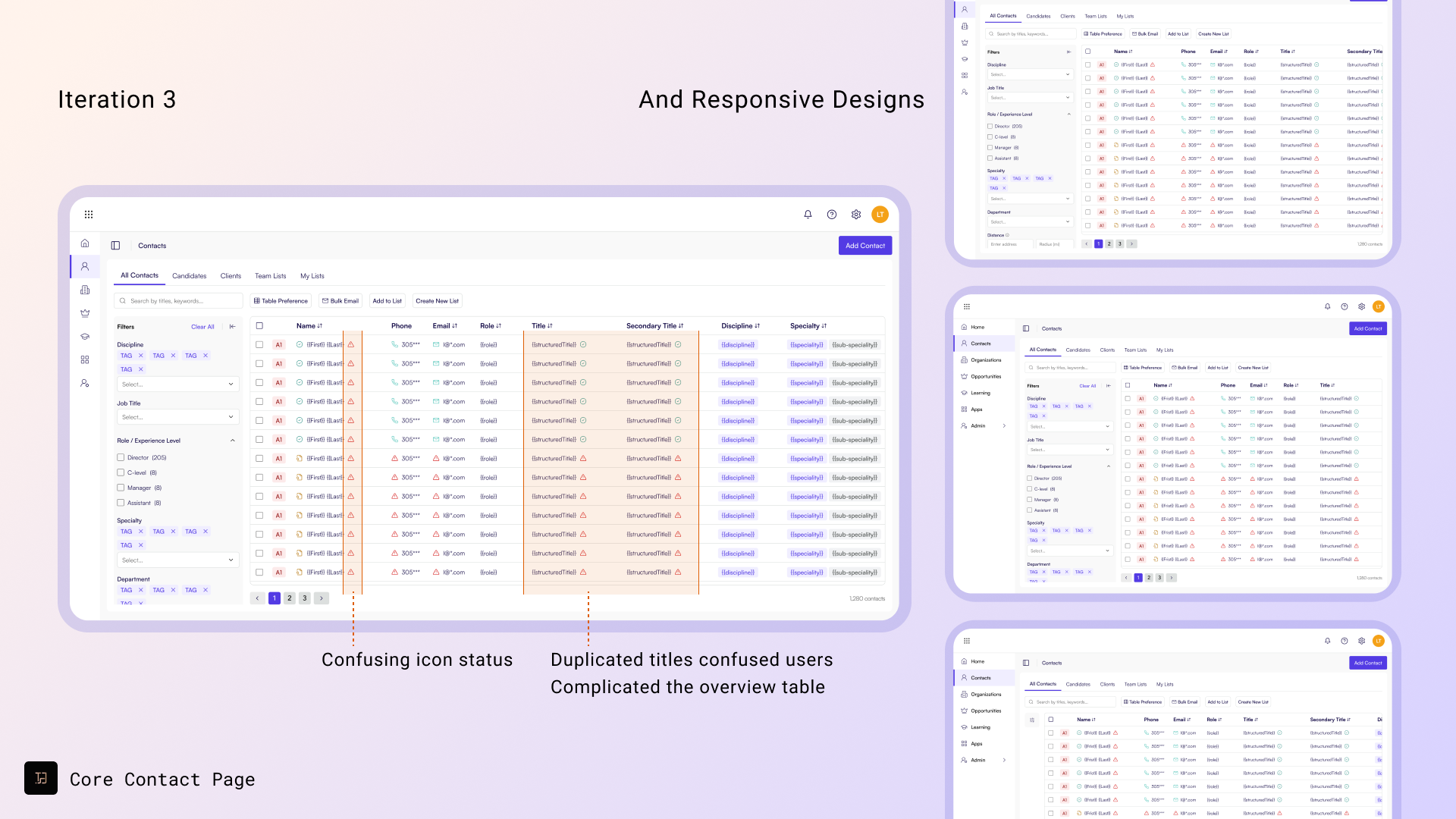
Design 1: Contact Overview – Enhancing Data Quality and Layout
Problem:
Recruiters needed confidence in contact accuracy but lacked visibility into data verification
How might we verify and confirm contact information to ensure data quality and seamless integration of job-title-related attributes?
Analysis and Solutions:
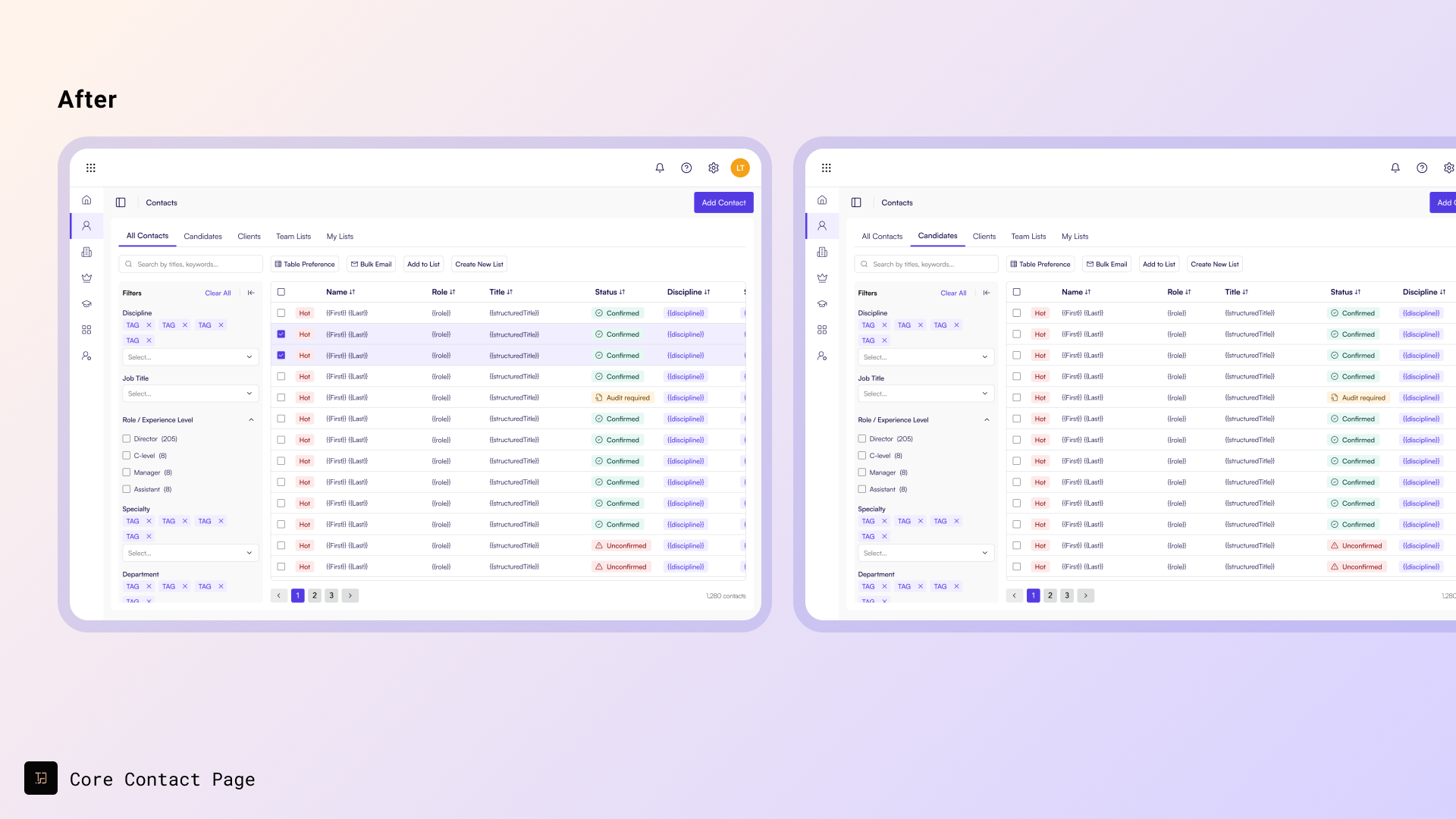
- Introduced a data verification flow with step-by-step confirmation.
- Integrated job-title-related attributes directly into the contact table.
- Added color-coded indicators for verified and unverified records.
- Displayed text feedback in filters for quick activity insights.
Outcome:
- Integrated with the new design system.
- Improved data verification, reducing errors when engaging with contact details.
- Enhanced searchability with tag-format attributes.
- Provided instant feedback through text labels in filters for activity levels.

💬 User insight
“The new verification workflow has improved data accuracy, but the process of adding contacts during calls is still cumbersome and time-consuming.”
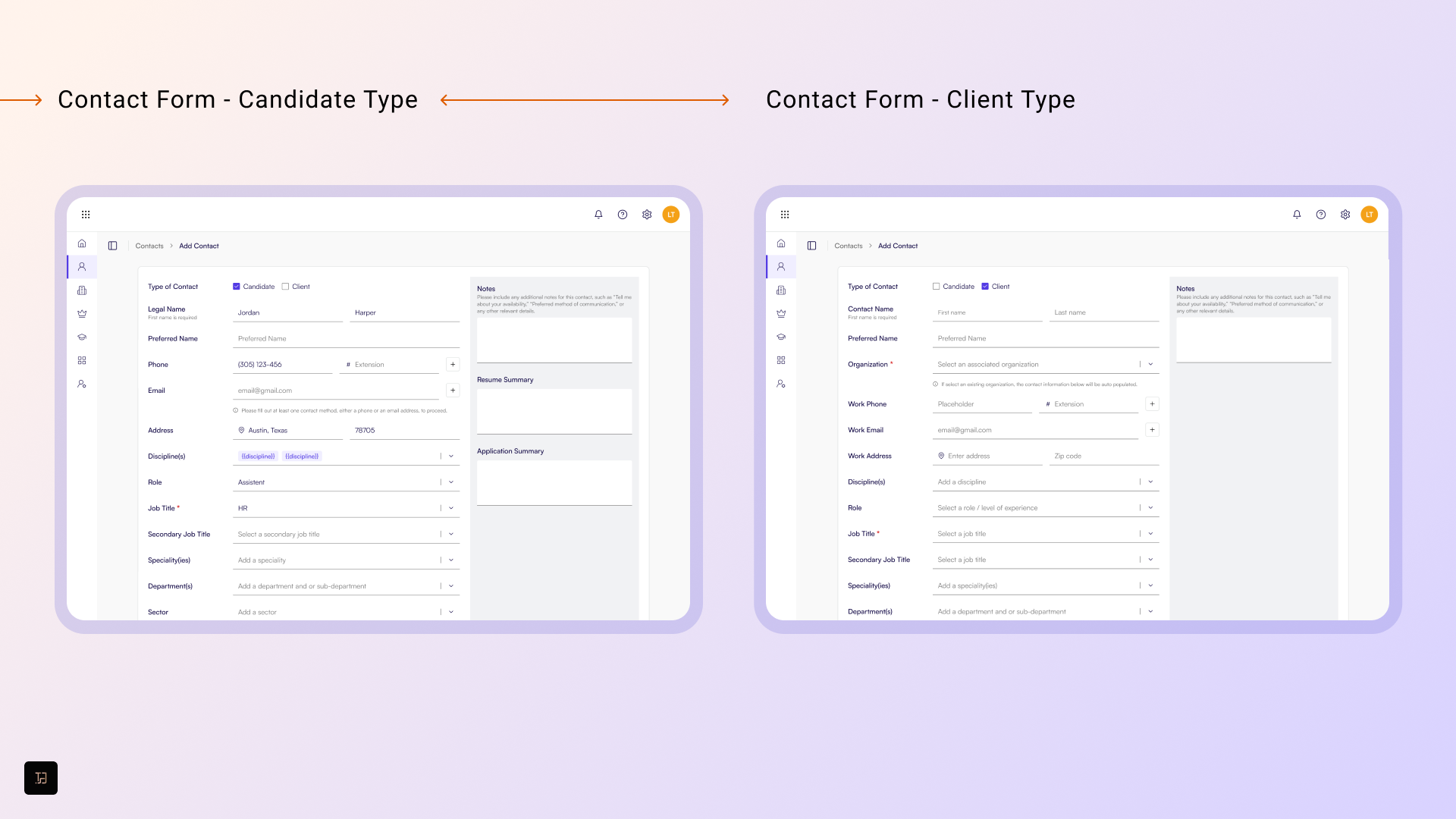
Design 2: Add New Contact – Streamlining Contact Entry During Calls
Problem:
Further iterations highlighted inefficiencies in managing contacts during phone calls. Typical scenarios involved:
- Adding a new candidate not yet in the system.
- Returning to the contact table to locate their name.
- Switching to another tab to write notes or updates.
This process was time-consuming and error-prone, driven by multiple manual steps and context-switching, leading to a new question: How might we optimize recruiter workflows to reduce interruption while they are calling and adding contacts through the platform?
Analysis and Solutions
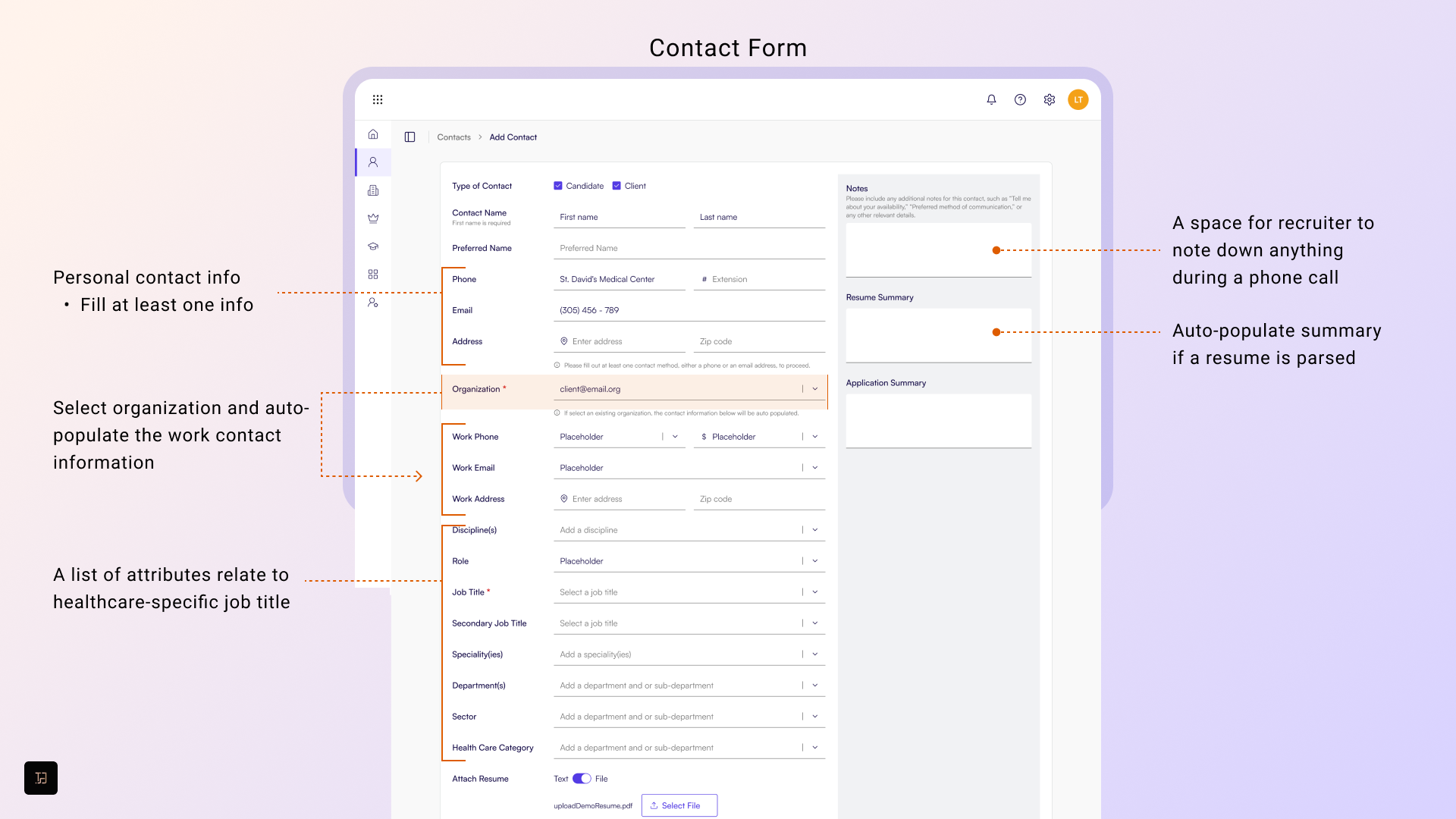
- Designed an in-call contact entry interface with quick-access fields.
- Implemented auto-populate for known details (name, phone, title).
- Integrated resume parsing for automated data capture.
Outcome
- Introduced resume parsing and auto-population for contact details.
- Enabled dynamic autofill for healthcare job titles and related attributes.
- Reduced manual entry and context-switching by more than 20 %, allowing recruiters to manage contact data in real time.

💬 User insight
“The in-call updates make managing information easier, but finding and organizing contacts quickly during critical tasks is still a challenge.”
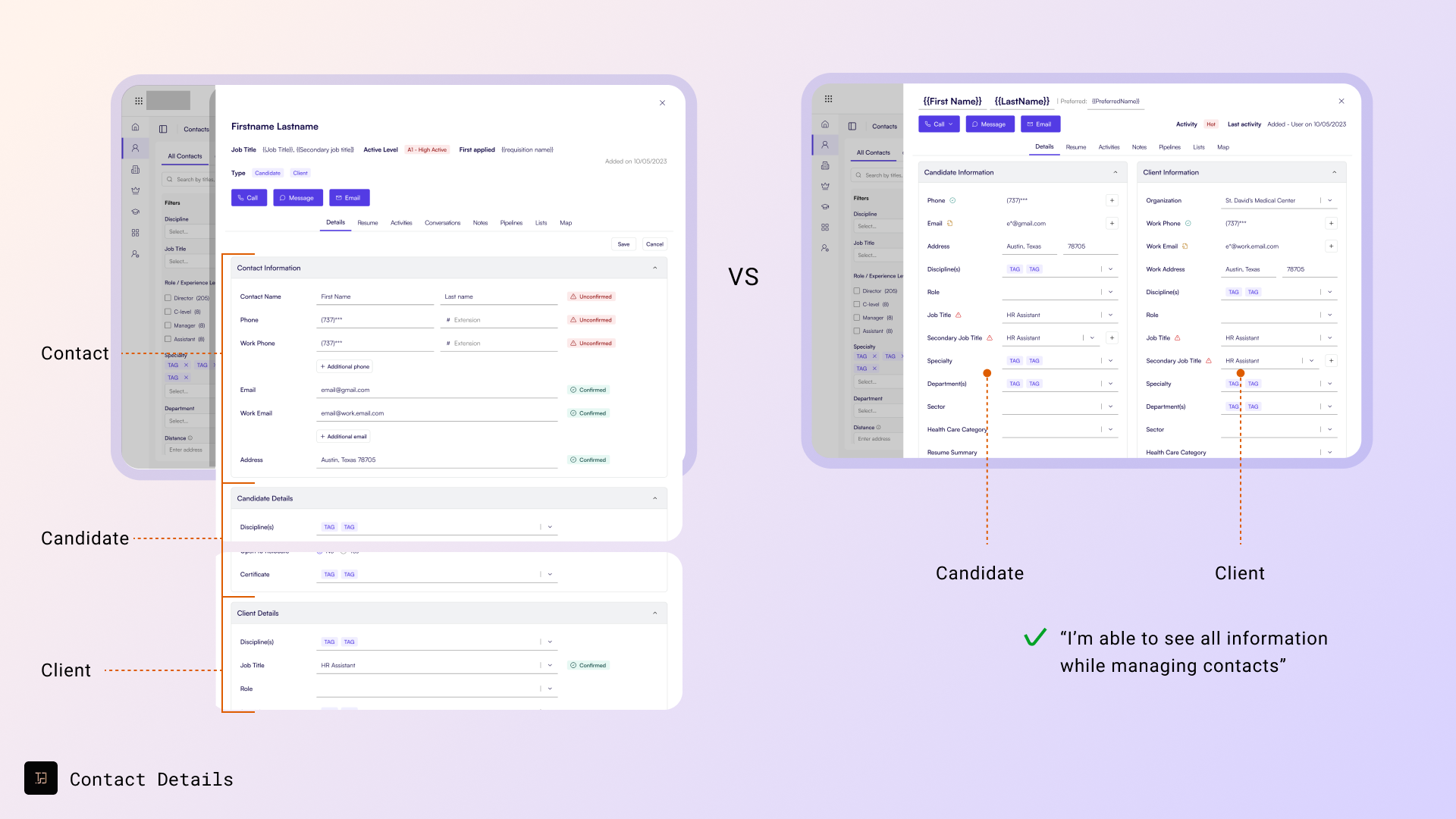
Design 3: Contact Details Page
Problem:
Recruiters struggled to locate, organize, and manage contacts efficiently. How might we make it intuitive for recruiters to view, organize and tag contacts to improve accessibility and streamline their workflow?
Analysis and Solutions:
- Created a merge-and-confirm system for duplicate or incomplete data.
- Added dynamic tagging and search for flexible organization.
- Standardized visual layouts for different contact types (candidate, client, prospect).
Outcomes
Improved accessibility, reduced data clutter, and enabled faster retrieval of critical contact information.
- Merged different types of details onto the same page using collapsible columns, allowing for a more organized and streamlined view.
- Prioritized the information hierarchy, ensuring that key details were displayed prominently and provided editable access for different groups of information.
- Integrated verification tags to clearly indicate the verification status while also allowing for a seamless future verification process. This approach not only improved accessibility but also laid the foundation for ongoing data validation and updates.


Impacts
Workflow Efficiency
- Real-time contact entry reduced task completion time by 20 %.
- Auto-population minimized repetitive manual steps.
Data Quality and Scalability
- Verification and attribute integration improved record accuracy.
- The structure now supports complex, multi-role data models.
User Experience
- Clear visual feedback improved confidence and understanding.
- Enhanced search and tagging increased engagement by 4 %.
Positive Feedback
- Recruiters reported fewer workflow interruptions during calls.
- The approach now informs future redesigns across core management pages.
Key Takeaways
✔️ Leading with Principles: Designing around scalability, visibility, and searchability created a foundation for long-term growth.
✔️ User Behavior as Strategy: Observing real recruiter workflows guided practical, high-impact improvements.
✔️ Feedback as a Design Engine: Iterative testing with recruiters ensured solutions solved real-world pain points.
✔️ System Thinking Yields Consistency: The new contact framework established logic and patterns adopted across multiple product modules.
This initiative not only boosted recruiting efficiency but also established a scalable UX foundation for the CRM’s evolving ecosystem—anchored in research, collaboration, and design leadership.

 Tsai-Shiuan Weng